What Is an MCP Server? Why It Matters for Your AI Workflow
What Is an MCP Server? Why It Matters for Your AI Workflow
If you use Claude Desktop or ChatGPT and you haven't heard of MCP, you're about to have one of those "wait, this exists?" moments. I had it a few months ago and immediately felt dumb for not knowing sooner.
MCP stands for Model Context Protocol. In plain English: it's a way to give AI chatbots access to your stuff. Your files, your databases, your email, your knowledge bases, your code repos. Instead of copy-pasting context into every conversation, the AI can just... go look at it.
Think of it like this. Without MCP, using Claude Desktop is like having a really smart friend who you can only communicate with by reading things aloud to them. They're helpful, but every conversation starts with ten minutes of "okay, let me catch you up on what's happening."
With MCP, it's like that same friend has access to your office. They can look at your files, check your data, and read your notes. You skip the catch-up and go straight to "what should I do about this?"
How it works (the non-technical version):
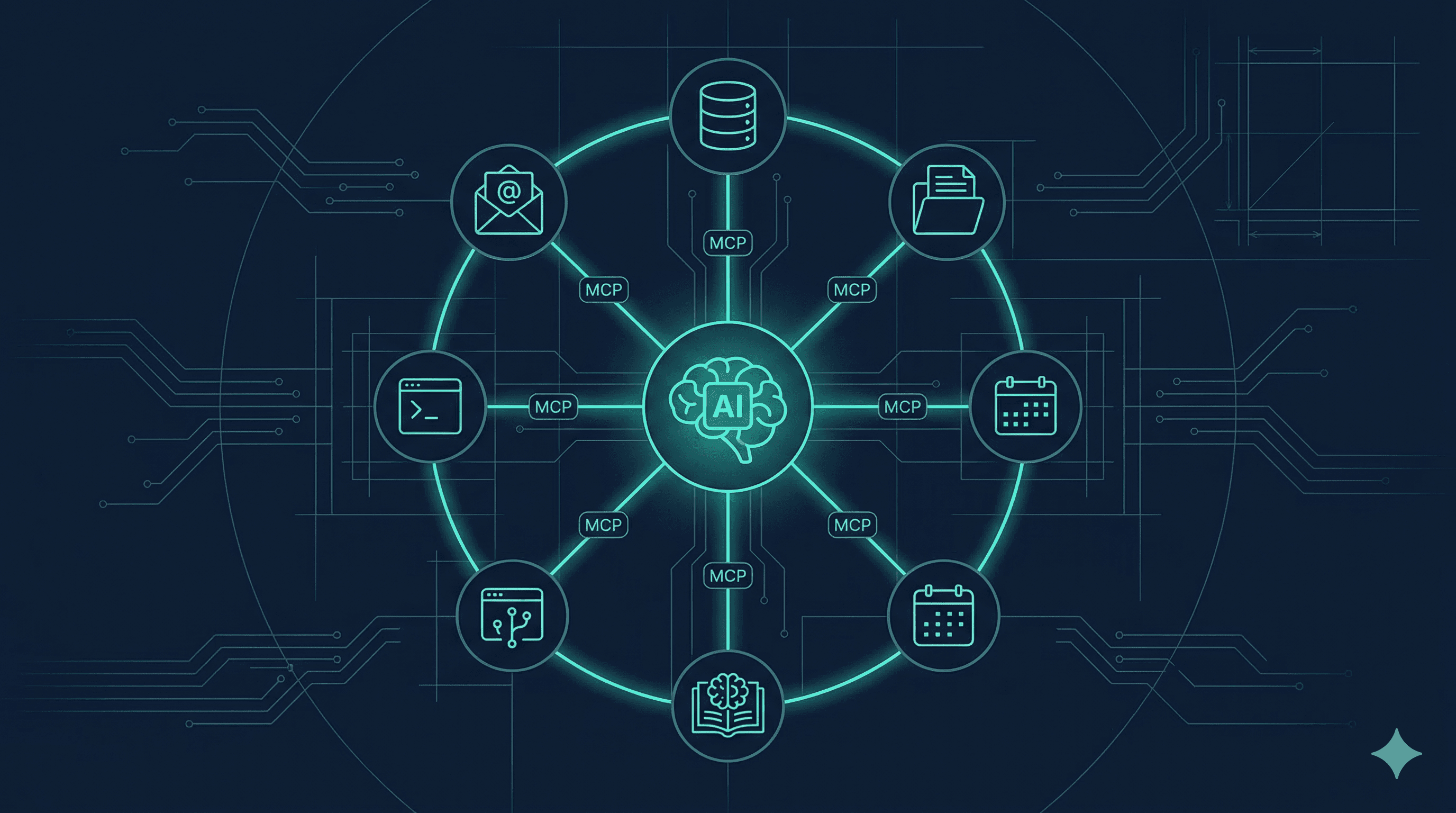
MCP servers are little programs that run on your computer and act as bridges between Claude (or other AI tools) and specific data sources. Each server connects to one thing: your local files, your GitHub repos, your Postgres database, your Adviserry Boards, etc.
When you ask Claude a question, it can call the tools provided by these servers to look up information before answering. "Search my newsletters for pricing advice" triggers the Adviserry MCP server to search your boards and return relevant content. "Read the file at /projects/adviserry/README.md" triggers the filesystem MCP server to fetch the file. Claude gets the results and uses them to form its answer.
You configure servers in a JSON file, restart Claude Desktop, and they're available. That's the whole setup.
Why this matters more than it sounds like it should:
The gap between "AI that answers questions from its training data" and "AI that answers questions from your data" is massive. It's the difference between a generic consultant and a consultant who's spent a week embedded in your company.
Every time I used to copy-paste a document into Claude, I was doing MCP's job manually. Every time I described my database schema in a chat message, I was doing MCP's job manually. Every time I pasted newsletter content to ask about it, I was doing MCP's job manually.
MCP eliminates all of that friction. And friction matters because it determines whether you actually use a tool or just think about using it.
What MCP servers exist right now:
The ecosystem is growing fast. Here are the categories that matter most:
File access: The filesystem MCP server lets Claude read and write files on your computer. This alone is a massive upgrade.
Code and development: GitHub MCP server for repos, issues, and pull requests. Various IDE servers for code context.
Data: Postgres, Supabase, and other database servers let Claude query your data directly.
Knowledge bases: Adviserry has an MCP server that lets Claude search your newsletter and YouTube boards. (I built this, and it's the MCP server I use most. Being able to ask Claude "what do my marketing newsletters say about this?" without switching apps is the workflow I always wanted.)
Productivity: Servers for Slack, Google Drive, Notion, Linear, and other work tools.
Web: Brave Search MCP server adds web search to Claude Desktop.
The practical impact on your workflow:
Before MCP, I used Claude Desktop for general questions and analysis. After MCP, I use it for everything. It's become my primary interface for my newsletter knowledge base (through Adviserry MCP), my codebase (through GitHub MCP), my files (through filesystem MCP), and my data (through Postgres MCP).
The conversations are dramatically better because Claude has context. Instead of me explaining what my product does, what my data looks like, and what my newsletters contain, Claude already has access to all of it. We skip the briefing and go straight to productive work.
How to get started:
If you're using Claude Desktop, start with one server. The filesystem server is the easiest win: tell it which directories to access, restart Claude Desktop, and suddenly Claude can read your project files. The difference is immediately obvious.
Then add one domain-specific server based on where your work lives. Adviserry if you're a newsletter and content person. GitHub if you're a developer. Postgres if you're data-driven.
The setup is a JSON config file and a restart. Five minutes. The payoff is permanent.
MCP is one of those things that seems like a niche developer feature until you try it. Then it just seems like the obvious way AI tools should work. Give it 15 minutes this weekend. You'll get it.